


Dark on Dark: How to Separate a Black Subject from a Black Background
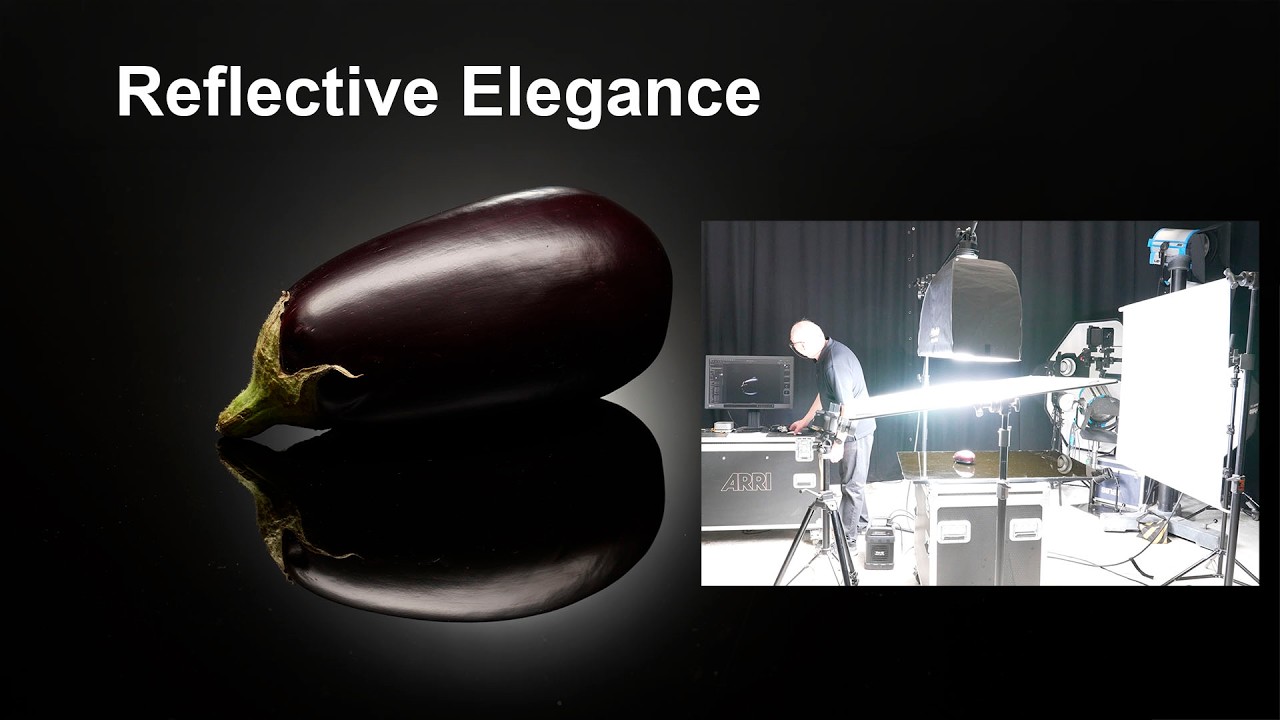
Put a dark subject on a dark background and the usual result is mud. The tones merge, the edges disappear, and the object loses its shape. Turning up the power doesn't fix it. What fixes it is deciding exactly where the light goes, and where it doesn't.
This setup does that with two lights: a softened key overhead for the highlights, and a hidden light behind the subject that builds a soft gradient to carve the edges out of the black.
Step 1: Start from black
Before any strobe fires, get rid of the room light. Shoot at your flash sync speed, low ISO and a small aperture. Here that's 1/125s, ISO 100 and f/16. If the test frame comes out black, every highlight in the final image is one you put there on purpose.
Step 2: Soften the key light
The key sits overhead. On its own, a softbox gives clean highlights on glossy surfaces. Add a diffusion sheet between the softbox and the subject and those highlights become smoother and more even. This double diffusion gives you shape on the top surfaces without hard hot spots.
Step 3: Separate the edges
The key light alone won't separate a dark subject from a dark background. For that, a second strobe goes behind the subject, hidden from the camera, and fires through a diffusion screen. This creates a soft gradient right behind the subject. Against it, the dark outline stands out clearly, and on a glossy surface like black Perspex the gradient also shows up as a reflection, so the base of the object reads too. Because the light is aimed at the screen and not at the set, it doesn't spill onto the rest of the frame.
- Take a test frame with the strobes off. If anything is still visible, stop down, lower the ISO or switch off the modelling lights.
- Put a diffusion sheet in front of the key light to smooth the highlights on glossy surfaces.
- Hide the rear light directly behind the subject so the subject itself blocks it from the camera.
- Move the rear light closer to or further from the screen to make the gradient tighter or wider.
Video and images via Camera Club Live





0 comments:
Post a Comment