


No More Glare: The Smarter Way to Retouch Eyeglasses in Photoshop
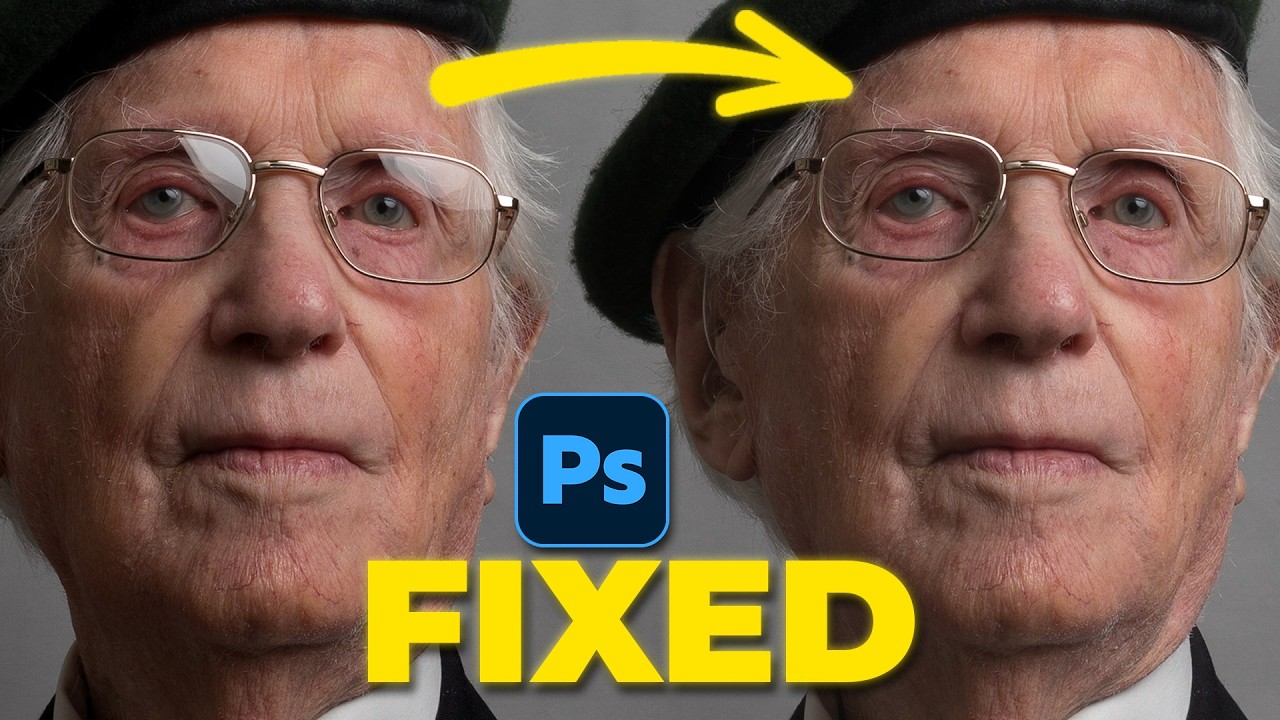
Lens flare and eyeglass reflections have long been the bane of portrait photographers — hours of cloning, healing, and frequency separation just to reclaim a clean gaze.
AI retouching promised relief, but early tools traded one problem for another: the reflection disappeared, and so did the eyelid shape, eyebrow density, or frame geometry.
Firefly Image Model 5 changes the equation. Rather than filling the selected area with invented data, it treats the reflection as something additive to remove — leaving the original skin texture, hair, and structure untouched beneath. The difference in a high-resolution crop is immediately visible.
Advanced Precision in Eyewear Retouching
A few things worth knowing before you use it:
• Select tightly. Use the Selection Brush on the lens only — stray into surrounding skin and you're asking for unnecessary regeneration.
• Choose the Preview model explicitly. Detail preservation is its strength; creative generation is someone else's job.
• Budget your credits. Model 5 costs more per pass, but it typically gets it right the first time.
• Check the frames. After generation, toggle the layer on and off to confirm the glasses' geometry held.
• Choose the Preview model explicitly. Detail preservation is its strength; creative generation is someone else's job.
• Budget your credits. Model 5 costs more per pass, but it typically gets it right the first time.
• Check the frames. After generation, toggle the layer on and off to confirm the glasses' geometry held.
The best retouching is invisible. With the right tool and a disciplined selection, it now also takes about thirty seconds.
Image and video via Glyn Dewis





0 comments:
Post a Comment